192.168.68.64
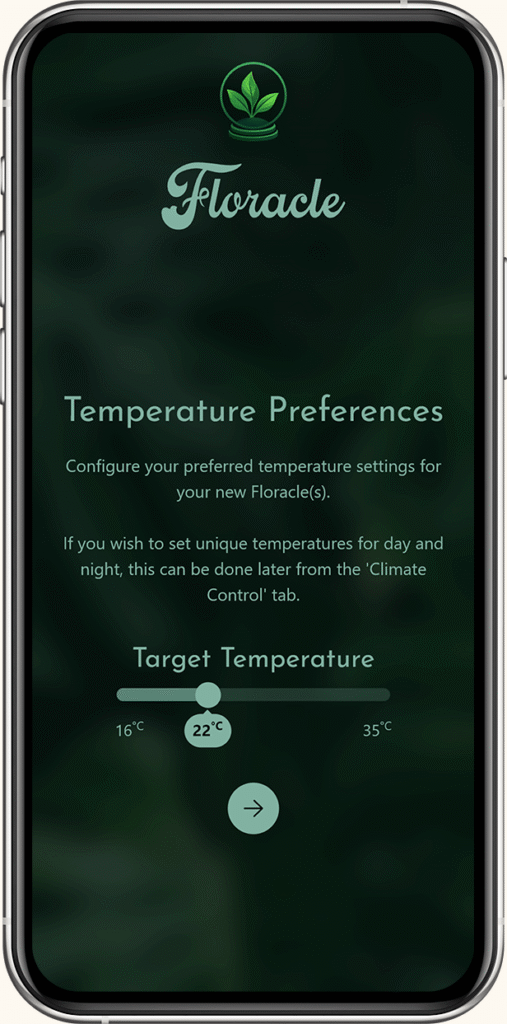
Let’s define the baseline climate for your greenhouse cabinet.
Choose the temperature that best fits your plants’ natural habitat. Floracle will continuously monitor the environment and automatically adjust heating and airflow to maintain a stable microclimate.
You always adjust this later or fine-tune separate day and night temperatures in the Climate Control tab.
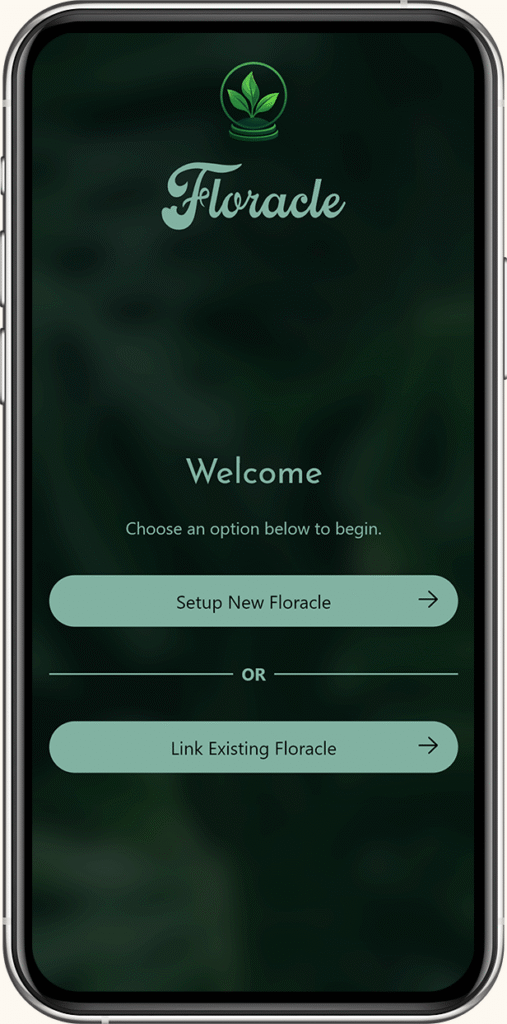
To get started, choose how you’d like to connect your device.
Setup New Floracle
Select this option if your Floracle is brand new or has been factory reset. You’ll connect to it via Bluetooth and provide your Wi-Fi details so it can join your local network.
Link Existing Floracle
Choose this if your Floracle is already connected to your Wi-Fi network. Simply enter its hostname or IP address to add it to the app.
Make sure your phone is connected to the same Wi-Fi network that your Floracle uses.
Floracle controller
Temperature & humidity sensor
Power cable
Quick start guide
Everything you need to get started is in the box.
Floracle is made up of a few different parts that each play their own role:
Controller (Floracle):
The brain of the system. It monitors, decides, and controls your connected devices.
Sensors:
These are the ‘eyes and ears’. They measure temperature and humidity.
Connected devices (actuators):
The muscles. These actually change the environment: like heaters, humidifiers, fans, or lights.
Equipment:
Your full Floracle setup: the controller, sensors, and connected devices working together.
Accessories:
Optional extras that make your setup nicer or easier to use, like display screens, mounting kits, or covers.
In short: Floracle is the brain, sensors feel the environment, devices change it, and accessories make it even better.
Floracle is a smart climate controller designed specifically for greenhouse cabinets. It operates fully automatically: managing temperature, humidity, lighting and airflow by controlling your connected devices (such as a humidifier, heater, fan, and grow lights) to create a stable and ideal environment for your plants.
The Floracle controller features an e-ink display and a rotary knob, allowing you to easily view or adjust your preferred settings. The enclosure is made from Bioplex multiplex: A FSC-certified eucalyptus plywood that is assembled with a biological adhesive, free from toxic and carcinogenic substances such as formaldehyde.
For the electronics, Floracle works closely with a team of engineers to ensure compliance with all EU safety standards.
Floracle is a smart climate controller that continuously monitors and analyzes your greenhouse cabinet’s environment. It precisely regulates temperature, humidity, airflow and lighting by automatically switching connected devices such as your humidifier, heater, fans and grow lights on or off, including advanced VPD control and adaptive day/night scheduling.
With 24/7 climate monitoring and remote access through the app, you can always see what is running and how your climate is developing, ensuring your plants get the exact conditions they need to thrive without constant manual intervention or worry.
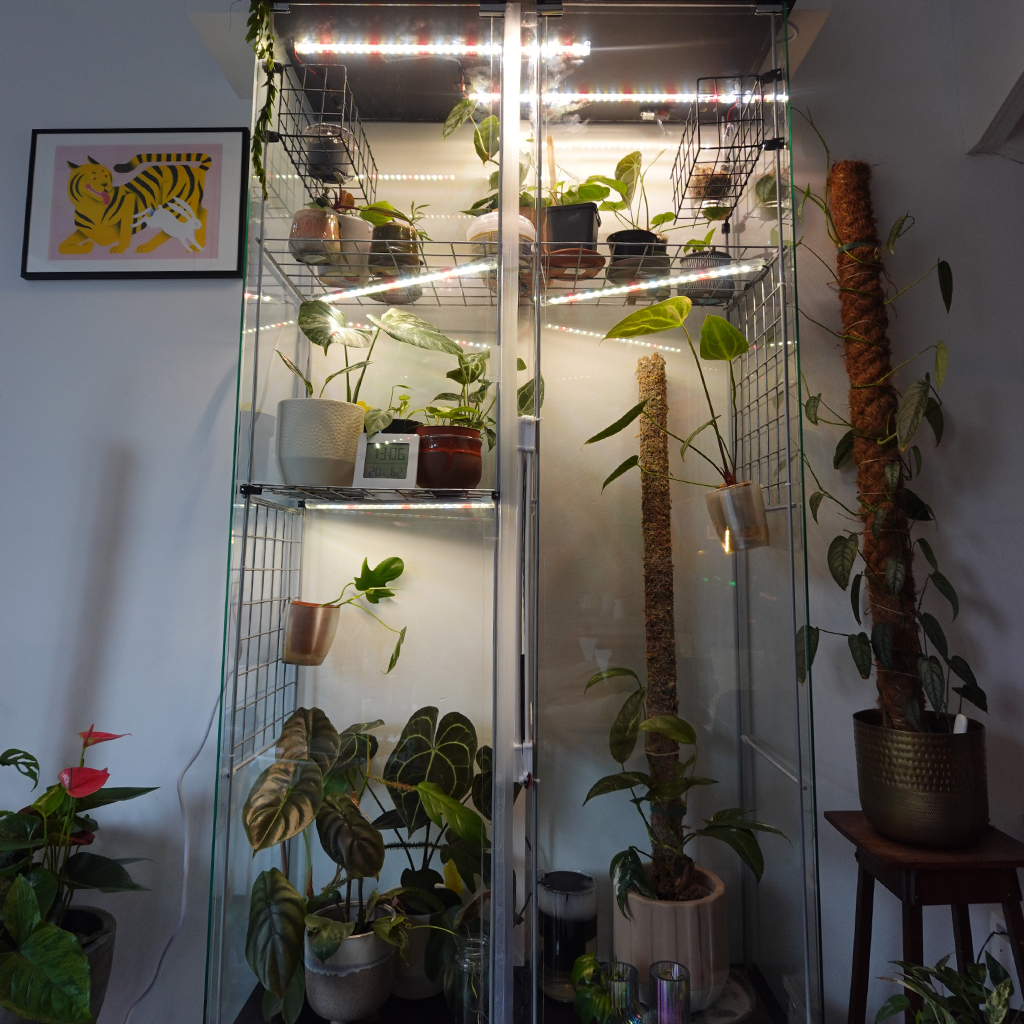
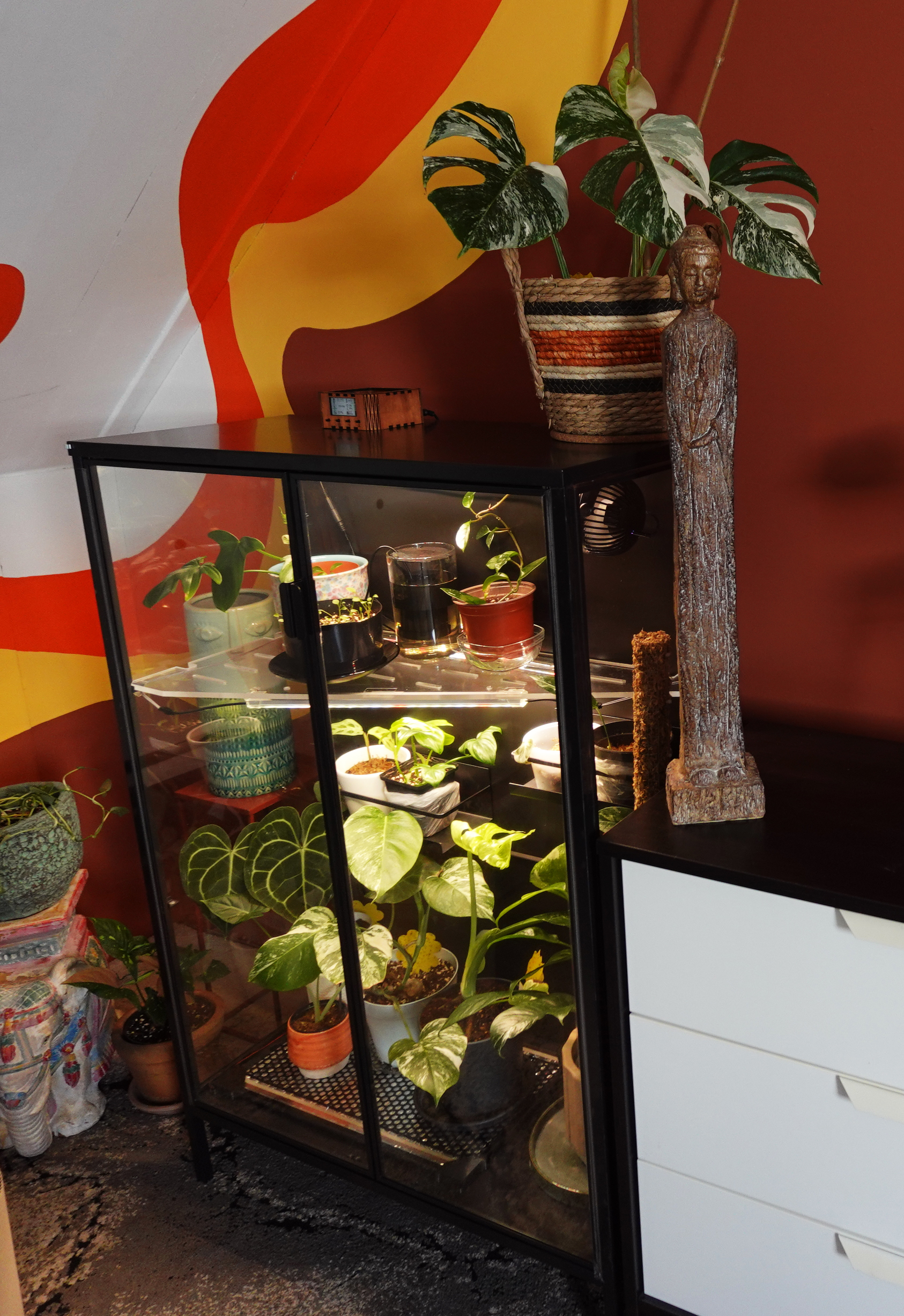
A greenhouse cabinet is a display cabinet converted into a mini indoor greenhouse. By adding grow lights, humidifier, fans and/or heating, you can control the climate inside it, giving your plants an ideal climate. Something that is hard to achieve in a regular living room.
Housing your plants in a greenhouse cabinet is not just beneficial for your plants, but also a rewarding hobby that brings a green eye-catcher in your home.
Floracle does not require an internet connection or a subscription. All climate control functions work fully offline, directly from the Floracle controller using the built-in E-Paper display and rotary knob.
However, connecting Floracle to your local Wi-Fi has big benefits like regular updates that brings improvements and new features, easy configuration and remote control through the Floracle app, and integration with Home Assistant. Even when connected, all data stays local. Floracle doesn’t rely on the cloud, we don’t use, store or see your user data and we will never charge recurring fees.
You can use only the controller. The e‑paper display and rotary knob are enough to set and change your target VPD, day and night temperatures, day/night times, fan settings, and to control lights and other outlets manually, no phone or app needed.
If you want to view or change settings from your phone, or control Floracle when you’re away (e.g. via Home Assistant), you’ll use the app or that integration, but for running the cabinet at home, the controller alone is enough.
Floracle itself doesn’t require any modifications to your cabinet.
You only need to route the cables from the inside to the outside. Some people use existing gaps, while others prefer drilling a new hole for a cleaner installation. We recommend drilling a small hole. it may sound a bit daunting, but it ultimately makes cable management much easier and neater.
No, and that is important to us. We won’t lock you into specific brands. It’s your cabinet, so it’s your choice what you want to add to it.
You can connect almost any grow light, heater and humidifier, as long as it can be switched on/off via mains power and stays within the 450W limit per device.
As for the fans, we wanted to make acquiring those as easy as possible. You can use any generic fan that is intended as an internal PC case cooling fan. These fans are robust, have mounting holes and are generally widely available.
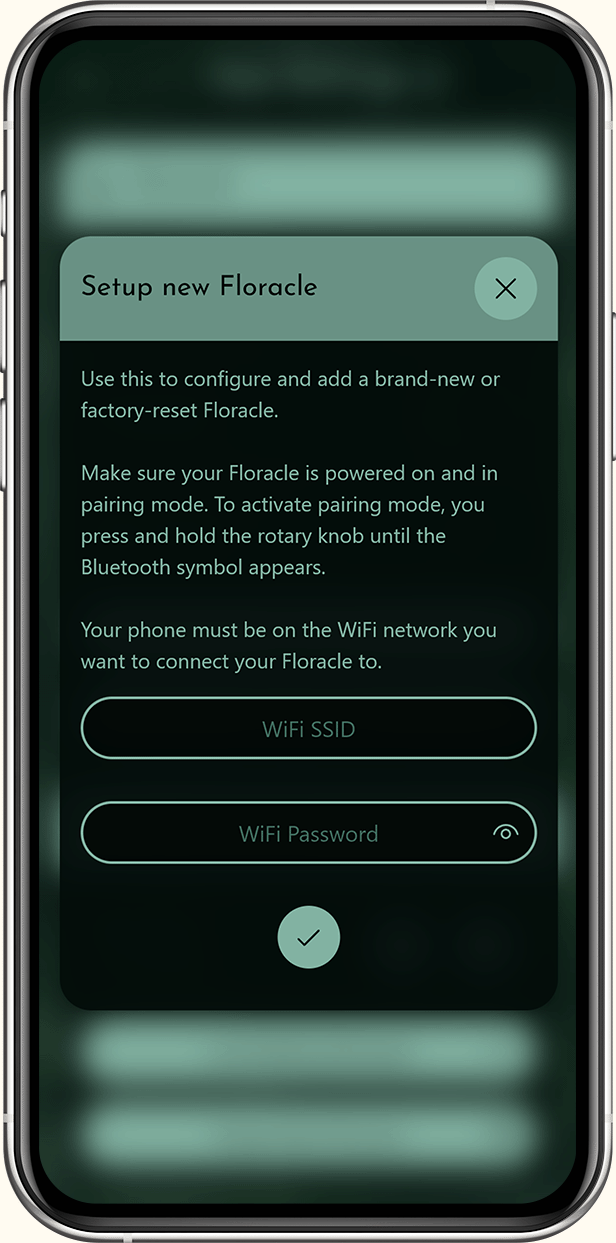


Bluetooth is used only during the first-time Wi‑Fi setup. Your phone uses Bluetooth to send the Wi‑Fi network name and password to the Floracle. You put Floracle in pairing mode (hold the rotary knob until the Bluetooth icon appears), turn on Bluetooth on your phone, then finish setup in the app.
Once Floracle is on your Wi‑Fi, the app talks to it over your home network. You don’t need to keep Bluetooth on for normal use. Use it again only when adding another Floracle or redoing Wi‑Fi setup (e.g. after a factory reset).
Definitely not. Floracle is fully adjustable and works for many types of plants. Most greenhouse cabinets are filled with humidity-loving plants like orchids and aroids, so the default settings are optimized for warmth and higher humidity.
If you grow plants that prefer drier conditions, like cacti or succulents, you can simply adjust the target values. Your humidifier will hardly run in that case, while your plants still benefit from the controlled light, temperature and airflow Floracle provides.
Thanks to VPD control (Vapor Pressure Deficit), Floracle automatically balances humidity and temperature. This creates the ideal microclimate for any plant, whether it comes from the rainforest or the desert.
Not at all. Floracle is designed for all plant enthusiasts: from beginners to advanced growers. The device handles all the complex climate control so you can just focus on enjoying your plants.
Installation: No coding or technical background needed. You plug your lights, heater, humidifier and fans into the labelled outlets on the Floracle controller and follow the in-app setup (Wi‑Fi, sensor, schedule) or set the time once in the menu. Everything is plug-and-play.
Daily use: No technical knowledge required. The controller and the Floracle app guide you through setting a target VPD, day/night times, and optional features like Smart Fan. You adjust a few values; Floracle handles the rest.
Yes! Floracle isn’t permanently bound to one cabinet. Feel free to relocate it if you expand or upgrade your setup. You can even view and control multiple Floracle controllers from the Floracle app, so each cabinet has it’s own Floracle.
The Floracle controller is placed outside the greenhouse cabinet and controls the connected devices placed inside it. The design is fully compatible with popular IKEA cabinets that are frequently converted into greenhouse cabinets. All you need to do is neatly route the cables from your connected devices outside through an existing opening or a small hole you can easily drill yourself. Using a cable grommet or tie wraps to guide the cables keeps everything clean and tidy.
That depends on what you mean by saving.
Your energy consumption won’t drop dramatically, because your lights and humidifier still use the same amount of power. However, Floracle prevents wasted runtime and it helps avoid plant loss caused by unstable conditions.
Healthier plants thrive longer, so you will not need to keep replacing them. Floracle saves you a lot of daily effort. No more switching devices on and off manually, no more checking meters. Just enjoy your plants or spend your time on something you actually enjoy.
For many users, Floracle pays for itself primarily through healthier plants and peace of mind.
Each of those devices only deal with one aspect of the climate. Floracle brings everything together and automatically adjusts them to work in sync. It measures, reacts and balances the climate so you do not have to constantly step in.
You can absolutely run a cabinet with separate devices. What Floracle does is bring them together. Instead of checking a hygrometer, adjusting timers, or turning fans on and off, Floracle measures the conditions and adjusts automatically.
The result is fewer fluctuations, fewer worries and less daily effort for you.
Yes. Floracle doesn’t require you to use all outputs. You can start with, for example, just lights and a fan. You can always add more devices later. Simply plug them in and Floracle will start including them.
Plants release moisture through their leaves to stay healthy. This is called evaporation. For that to work, the air around them must be able to absorb that moisture. VPD (Vapor Pressure Deficit) tells you how easily a plant can evaporate water.
Unlike relative humidity (RH), VPD takes temperature into account, because warm air can hold more moisture than cold air. VPD is measured in kPa (kilopascal), a pressure unit that indicates the “moisture demand” of the air. The lower the VPD, the more humid the air is. The higher the VPD, the more dry the air is.
If evaporation is too slow or too fast, plants get stressed.
The table below shows how different VPD values affect plant health:
| VPD Range | Meaning | Result |
|---|---|---|
| Too low (0.0–0.4 kPa) ️ | Air is very moist, plants struggle to evaporate | Risk of rot, mold and weak growth |
| Ideal range (0.7–1.0 kPa) | Plants evaporate comfortably | Healthy growth and strong leaves for most plants |
| Too high (>1.2 kPa) | Air is very dry and pulls moisture out of the plants | Risk of crisp edges and dehydration stress |
Floracle uses its sensor to measure real time values of your climate.
Floracle calculates VPD using the current temperature and humidity registered by the sensor. It combines both values to give a more accurate measure of how your plants experience moisture. The default Floracle target VPD is 0.85 kPa, which is a good starting point for most plants. In Floracle’s settings, you can adjust your preferred target VPD.
If the current VPD is not matching your target VPD, Floracle will adjust your climate automatically. When the measured VPD rises above the VPD target, the humidifier will be turned on. If it drops below the VPD target, the humidifier will be turned off.
The result is a stable climate where your plants can breathe, drink and grow at the same time.
With Floracle you can set a target temperature, but you cannot set a separate humidity value. This is because humidity alone doesn’t tell much about how your plants feel. The same humidity can mean different things at different temperatures. For example:
60% at 18°C has a VPD of 0.83 kPa, which is in the ideal VPD range.
60% at 28°C has a VPD of 1.51 kPa, which is critically dry.
Even though the humidity is the same, the plant’s experience is totally different. A fixed humidity value ignores temperature, while VPD adjusts humidity to match the temperature.
Instead, Floracle works with a target VPD, which gives a much more accurate picture of what your plants need.
Vapor Pressure Deficit for your plants
For most tropical houseplants, the default VPD of 0.85 kPa is ideal. Aroids (like Monstera or Anthurium) thrive in this range. Orchids often prefer slightly higher humidity (lower VPD).
You can adjust your target VPD through settings. You can set any target VPD in the 0.5–1.5 kPa range.
You set a day start and night start time (for example 8:00 and 20:00). Floracle then switches automatically between the two phases: at day start the lights turn on, at night start they turn off.
You can also turn on day/night temperature mode. Then you set one target temperature for the day and one for the night. Floracle uses the day target while the lights are on and the night target while they are off. If you prefer a single temperature around the clock, leave day/night temperature mode off; you’ll still have one target temperature, and the light schedule keeps working as set.
With Smart Fan Mode on, Floracle turns your fans on or off automatically based on changes in temperature and humidity. That evens out moisture and heat in the cabinet, avoids hot spots, and helps keep the climate stable. It can also save energy and reduce noise compared to fans running all the time.
With Smart Fan Mode off, you control the fans yourself: you choose when they are on or off and, if applicable, their speed. The schedule and your other climate settings are unchanged.
Yes. With the manual light control, you can temporarily turn the lights on or off, regardless of the set schedule.
Once the next day/night cycle begins, the schedule automatically takes over again. You do not have to worry about messing anything up — Floracle simply continues following your lighting plan.
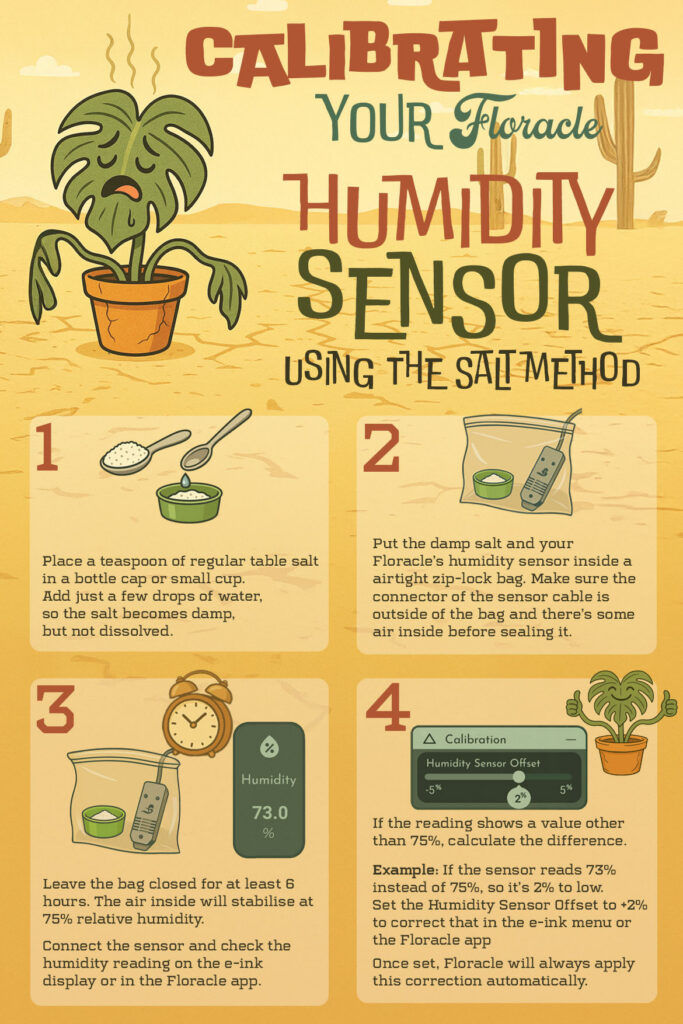
Calibrating the humidity sensor using the Salt Method
Floracle is designed to be compatible with nearly every greenhouse cabinet. Many plant lovers transform display cabinets like the IKEA Milsbo or IKEA Rudsta into greenhouse cabinets, but some even build their own from scratch.
To install Floracle, you’ll need an opening for the wires that run from the controller (which sits outside your cabinet) to the accessories that sit inside the cabinet, like the fans or the grow lights. In most cases, a single round opening of about 14 mm is enough to pass all the cables through. Some cabinet owners drill a new hole or enlarge an existing one, while others simply use the small gap between the doors and side panels.
Whether you’re just getting started or already deep into your greenhouse journey, Floracle fits right in.
Yes! Floracle works with most plug-in grow lights, heaters, humidifiers and fans, as long as they start running automatically when powered on.
If your device needs you to press a button or remote to start, it won’t respond to Floracle’s smart outlet control.
Tip: Plug your device in manually. If it starts right away, it will work with Floracle.
Floracle controls devices by switching their power on and off.
That means it’s compatible with simple plug-in devices that don’t rely on digital menus, remotes, or built-in timers.
Each output supports up to 2A (450W), which is plenty to maintain the climate in any greenhouse cabinet
Most greenhouse cabinets are fine with 2 to 4 computer fans. It really depends on the size of your greenhouse cabinet. Floracle has two fan outputs; you can use splitters or daisy chain for more fans, max 8 total.
Both work, as long as they plug into a standard outlet. Just make sure you do not have to press a button after you plug it in before it turns on. Our experience is that the humidifiers that are marketed as ‘reptile humidifier’ or ‘reptile fogger’ work the best for greenhouse cabinets.
You can, but only if their total power stays within the outlet’s limit (2A / 450W). For example, you can daisy chain multiple grow lights or use a power strip if the individual lights have their own mains plug.
As for the fans, you can use a splitter cable or board to control more than one fan per group. Do not connect more than eight (8) fans in total, due to power restrictions.
Not directly. Floracle controls power on or off, not the intensity.
If you want dimming, you’ll need lights that have integrated dimmers that can be switched by Floracle’s outlet. You can also buy a stand-alone dimmer. Connect the growlight to the outlet of the dimmer. You connect the power cable of the dimmer itself to Floracle’s lights outlet (Floracle switches the dimmer while the dimmer itself handles the brightness.)
Be aware that not every (grow)light is suitable for dimming.
All plants grow better in stable conditions, but Floracle is most valuable for species that need humidity and warmth beyond what most homes naturally provide. Tropical plants like Philodendron, Anthurium, Alocasia, Monstera, Pothos (Aroids), Orchids, Begonias, Hoyas, and ferns especially benefit, since they require higher humidity, steady temperatures, and controlled light cycles.
Plants that prefer dry air (like cacti and other succulents), don’t need the extra humidity. But they still benefit from a stabilized climate with consistent temperature, light and airflow.
Floracle lets you set and maintain temperature, humidity (through VPD), light, and airflow so that each plant can thrive in conditions similar to its natural habitat.
No device can fully prevent pests or mold, but Floracle lowers the risk by keeping the climate balanced. Mold and mildew thrive in stagnant, overly humid air. Floracle’s smart fan control and VPD-based humidity regulation reduce those conditions, while consistent airflow helps discourage fungus gnats and leaf spot diseases.
By maintaining a stable temperature, airflow and humidity, Floracle makes plants stronger and less vulnerable to pests and mold, but regular plant care is still needed to keep pests and mold away.
Yes. Plant growth is strongly tied to climate stability. Consistent temperature, humidity, light and airflow all support photosynthesis, nutrient uptake, and root development. Floracle regulates these conditions, including Vapor Pressure Deficit (VPD), so plants can hydrate and breathe efficiently.
This results in steadier growth, healthier roots, and more resilient foliage.
Yes. Imported plants often struggle with sudden changes in humidity and temperature after transport. Floracle creates a stable “recovery zone” where you can gradually adjust conditions, reducing transportation shock. By keeping VPD, airflow and temperature steady, Floracle helps delicate or rare imports settle in more smoothly.
You can start with higher humidity and stable warmth, then gently dial things closer to your regular settings. This slow transition lowers stress, reduces leaf loss, and helps rare imports bounce back stronger. Think of Floracle as a soft landing pad after a long journey.
Yes. Floracle keeps temperature, humidity, airflow and light schedules stable without daily attention. As long as your humidifier has water and your connected devices stay powered, your plants remain stable until you return.
Floracle unfortunately won’t water your plants for you, but it will keep your “mini-jungle” climate perfect until you’re back.
Floracle does not require an internet connection or a subscription. All climate control functions work fully offline, directly from the Floracle controller using the built-in E-Paper display and rotary knob.
However, connecting Floracle to your local Wi-Fi has big benefits like regular updates that brings improvements and new features, easy configuration and remote control through the Floracle app, and integration with Home Assistant. Even when connected, all data stays local. Floracle doesn’t rely on the cloud, we don’t use, store or see your user data and we will never charge recurring fees.
Yes, remotely controlling your Floracle outside of your home is possible through Home Assisant integration.
You can control your Floracle in 3 different ways: via the Floracle controller, Floracle app or Home Assistant.
With Floracle, we envisioned a greenhouse controller for every cabinet grower: both newcomers and those who already own connected devices such as grow lights or humidifiers. Unlike smartphones, which all use USB-C, there’s no universal standard for these connected devices. The only way to make Floracle as broadly compatible as possible was to use the standard mains power plug to control them.
We developed Floracle to be compatible with the European standards: 220 VAC and suitable for C, E, or F plugs; both as input as output.
In short, Floracle is compatible across nearly all European countries without an adapter, except for the UK, Ireland, Switzerland, and Denmark.
You can check which plug type is common in your region at https://www.iec.ch/world-plugs.
Calibrating the humidity sensor using the Salt Method
With the e-paper display and rotary knob you can view and adjust all functions Floracle has to offer from the controller, without needing the Floracle App or Smarthome. Press the big button (the rotary knob) once to enter the menu. In the menu you can rotate the button or press it to navigate through all the options.
Yes! Floracle runs on ESPHome, so it connects seamlessly to Home Assistant. You’ll be able to monitor and control your Floracle in Home Assistant after adding the integration, including optional remote access (via your own VPN).
Floracle automatically saves your settings and resumes controlling your connected devices once power returns.
Your targets and schedules are stored in the Floracle controller’s flash memory (non-volatile), so they are kept when the power goes off. Like files on a flash drive.
We added a small backup battery on the board that powers the real-time clock (DS3231) during a power cut, so even the time stays correct and day/night schedules stay accurate. When power returns, Floracle boots safely; controlled outlets start off and then resume normal control. If the time is wrong after a long outage, resync the time in the app or set the correct time in the menu to keep day/night schedules exact.
Floracle is a 24/7 controller. Floracle is safe to leave if you make sure that all the safety precautions are met.
Ensure your humidifier tank (and plants) have enough water
Only use equipment that are in good condition and within the 450W per outlet limit.
Ensure that the heating source is not in contact with any plants or surfaces.
Keep water away from electrical outlets and electrical equipment.
The Floracle controller itself is completely silent, except for a faint clicking sound when your connected devices are turned on or off (heating, humidifier, lights). If you have connected devices that make a lot of noise, you will hear this when the controller turns them on.
No, Floracle itself doesn’t generate heat. It regulates your heater toward the target temperature and turns it off when the target is reached. Use a heater with its own safety features and place it sensibly.
Note: if you do not have fans or humidifier, Floracle will not be able to correct heat spikes or keep the climate balanced.
We recommend checking how hot your growlights get. In some cases, the light gets so hot that it can burn plants directly under it.
Floracle keeps running normally even without Wi-Fi. It stores your settings locally and continues controlling your connected devices. You can still control your Floracle via the E-ink display & rotary knob on the controller itself. You’ll just lose remote access until the Wi-Fi connection returns.
Time sync and firmware updates do require internet.
You can see if there is a new version available in Settings -> System. You can update the new version directly over Wi-Fi.
Note: If you haven’t connected Floracle to your local network, you are unable to update your Floracle’s firmware.
Yes, but treat it like any mains-powered device: keep cables tidy, avoid water on electrical parts, and place it out of reach.
Test the device:
Heater: set the target temperature higher than the current temperature. Within a maximum of 1 minute, the heater should switch on.
Humidifier: set the target VPD lower than the current VPD. Within a maximum of 1 minute, the humidifier should switch on.
Lights: switch the lights manually. They should switch immediately.
Fans: disable Smart Fan Mode, then switch the fans on manually.
Never connect any device that exceeds 450W power consumption.
If the time or day/night cycles seem incorrect, this is usually caused by an incorrect timezone setting or the internal clock not being synchronised.
Here’s how to fix it:
Check the Timezone
Go to Device Settings → Time and make sure the selected timezone matches your actual location. An incorrect timezone will shift your entire schedule.
Run “Synchronise Time”
In the same menu, tap Synchronise Time.
This requires an active internet connection. The process may take a few minutes to complete.
Confirm Day/Night Start Times
After syncing, go to the Climate Control page and verify that your Day Start Time and Night Start Time are set correctly.
Automatic time synchronisation is not possible without Floracle being connected to Wi-Fi.
In that case:
Open the device menu on your Floracle.
Check whether the displayed time is correct.
Make sure the Timezone is set correctly in the device menu (this can be adjusted locally).
If the time is incorrect, you will need to correct it manually on the device.
After confirming the correct time and timezone, verify that your Day and Night start times are configured as intended.
When restarting, the Floracle controller will reboot. All your settings will remain saved. Use this if the Floracle controller responds slowly or freezes. It is always safe to do this.
A factory reset will erase all your settings (including the Wi-Fi connection) and return Floracle to its original state. Use this if you want to start with a clean setup or if you plan to transfer your Floracle to someone else.
Note: The reset function is not available in the e-ink menu. You can briefly disconnect the power cable from Floracle, which functions the same as a reset.
Calibrating the humidity sensor using the Salt Method
In a small number of cases, Floracle does connect to your Wi‑Fi, but connecting the Floracle app to the Floracle device still fails.
You can quickly test whether this is your case:
http://<device-ip>
Example: if Floracle shows 192.168.1.101, browse to:
http://192.168.1.101
Important: use HTTP, not HTTPS.

You may see a browser warning like “Not secure” or a crossed lock icon.
That is expected in this test, because Floracle’s local web page is served over HTTP (no SSL certificate), not HTTPS.
For this local-network troubleshooting step, that is normal and not dangerous by itself:
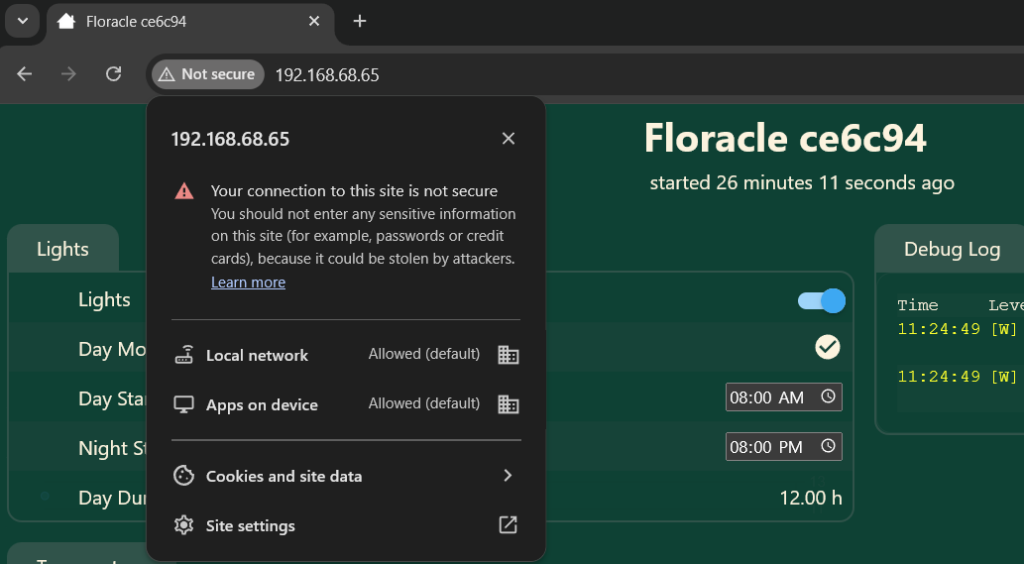
If the page loads in your browser, Floracle is online and reachable from your network.
You will see a page looking similar to the image below.
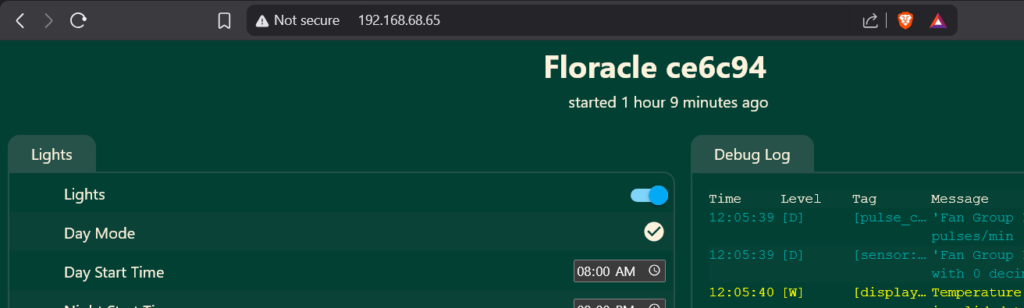
Now we know that the Floracle controller is successfully connected to your WiFi, but you can’t connect to the controller in the app, the issue is likely one of these:
On Android, apps must follow platform network security rules set by Android/Google.
Because Floracle uses local http:// access on the home network, the app must explicitly allow cleartext traffic for local destinations in its Android network security configuration.
10.x.x.x) in one clean rule for this use case, so apps often rely on explicit host/IP entries.As a result, Floracle can be reachable in your browser, but app access can still fail when your router/hotspot assigns an IP in a range that is not included in the app’s current allowlist.
10.x.x.x networks), and that specific local route is not covered by the app’s allowlist.192.168.x.x address, orSome networks block device-to-device traffic. This means that the network prevents that devices can ‘talk’ to each other. You can see that it is a problem when the Floracle App can’t talk to your Floracle climate controller. This is mostly the case in highly secure company WiFi networks, or so-called ‘guest networks’.
You can change the settings in the router settings to allow device-to-device traffic . Look for options such as:
Disable isolation on the SSID used by phone + Floracle, then reconnect both.
Your privacy comes first.
Floracle runs entirely on your local network and does not use a cloud service. Your user data, climate data, settings, and device information are not sent to external servers.
Your Wi-Fi credentials are stored only on your Floracle device and are never shared, sold, or transmitted to third parties.
In short: your data stays in your home, under your control.
The Floracle controller itself uses very little power. It runs on an energy-efficient ESP-class microcontroller and uses an E-paper display, which consumes almost no energy once updated.
Most of the total energy consumption comes from the connected devices, such as your heater, humidifier, lights, and fans.
Because Floracle only activates these devices when needed, it prevents unnecessary runtime and helps keep overall energy use as efficient as possible.
Delivery time depends on your location and current stock levels.
You’ll see the most up-to-date delivery estimate during checkout.
As a general guideline, we aim to ship your order within 2–5 business days.
Need your order by a specific date? Feel free to contact us. We’re happy to check what’s possible.
Floracle is thoughtfully designed, developed, and assembled in the Netherlands by us ,Djurre and Liza.
As passionate plant lovers ourselves, we build Floracle the way we would want it: plant-friendly, reliable, and privacy-first by design. Without investors, without ulterior motives, without compromise. Every detail reflects our hands-on approach and commitment to quality.
From concept to final assembly, Floracle is created entirely in the Netherlands by us, for fellow plant enthusiasts (and for ourselves).
Download the full Floracle product manual as a PDF. Choose your language:
Want to be the first to know about exclusive offers and updates?